How WhatsApp Business API Actually Works (And What It Costs)

When I started building TrackMonk, I wanted to add WhatsApp notifications for certain events. Simple enough, I thought. Turns out I had no idea what I was walking into.
Then when I built FormBeep, I had to actually understand all of it properly. Every edge case, every billing quirk, every reason a message might get rejected. So here’s what I wish someone had told me at the start.
Most people think the WhatsApp Business API is just “WhatsApp but for businesses.” It’s more complicated than that, and understanding how it works will save you a lot of confusion and money.
The two products that share a name
First, let’s get the confusing part out of the way. There are two completely different WhatsApp products for businesses.
WhatsApp Business App is a free app you install on your phone. You reply to customers manually, set up quick replies and away messages, and broadcast to a list of up to 256 contacts who have saved your number. That’s it. It’s basically regular WhatsApp with some business features bolted on.
WhatsApp Business API (also called the WhatsApp Business Platform) is completely different. It’s an API that lets you send automated messages at scale. No phone app involved. You connect to Meta’s servers programmatically, send messages through API calls, and receive incoming messages via webhooks. This is what companies use for order confirmations, appointment reminders, OTPs, and marketing campaigns.
To use the API you either go through a BSP (Business Solution Provider, like Twilio, Vonage, or WATI) which handles the technical setup for you, or you integrate directly with Meta. Most businesses use a BSP because the direct integration is a lot of work. I went direct with FormBeep, and it took longer than expected at every step.
Template messages
Here’s where most people get confused.
You can’t just send any message through the API to any user whenever you want. If you’re initiating a conversation (messaging someone who hasn’t messaged you recently), you can only send a template message.
Templates are pre-written messages you submit to Meta for approval. Meta reviews them and either approves or rejects them. Once approved, you can use them in API calls. The approval process usually takes a few hours but can stretch to several days.
Why does this exist? Meta’s way of preventing businesses from blasting unsolicited messages at people. Templates act as a filter. You can’t send bulk promotional messages without Meta having reviewed the content first.
Templates fall into three categories:
Marketing – promotional messages. Offers, new product announcements, campaigns directed at users who haven’t engaged recently. Highest per-message rate of the three.
Utility – transactional messages triggered by something the user did. Order confirmations, shipping updates, appointment reminders, payment receipts.
Authentication – one-time passcodes for login or account verification. “Your code is 847291. Do not share this with anyone.”
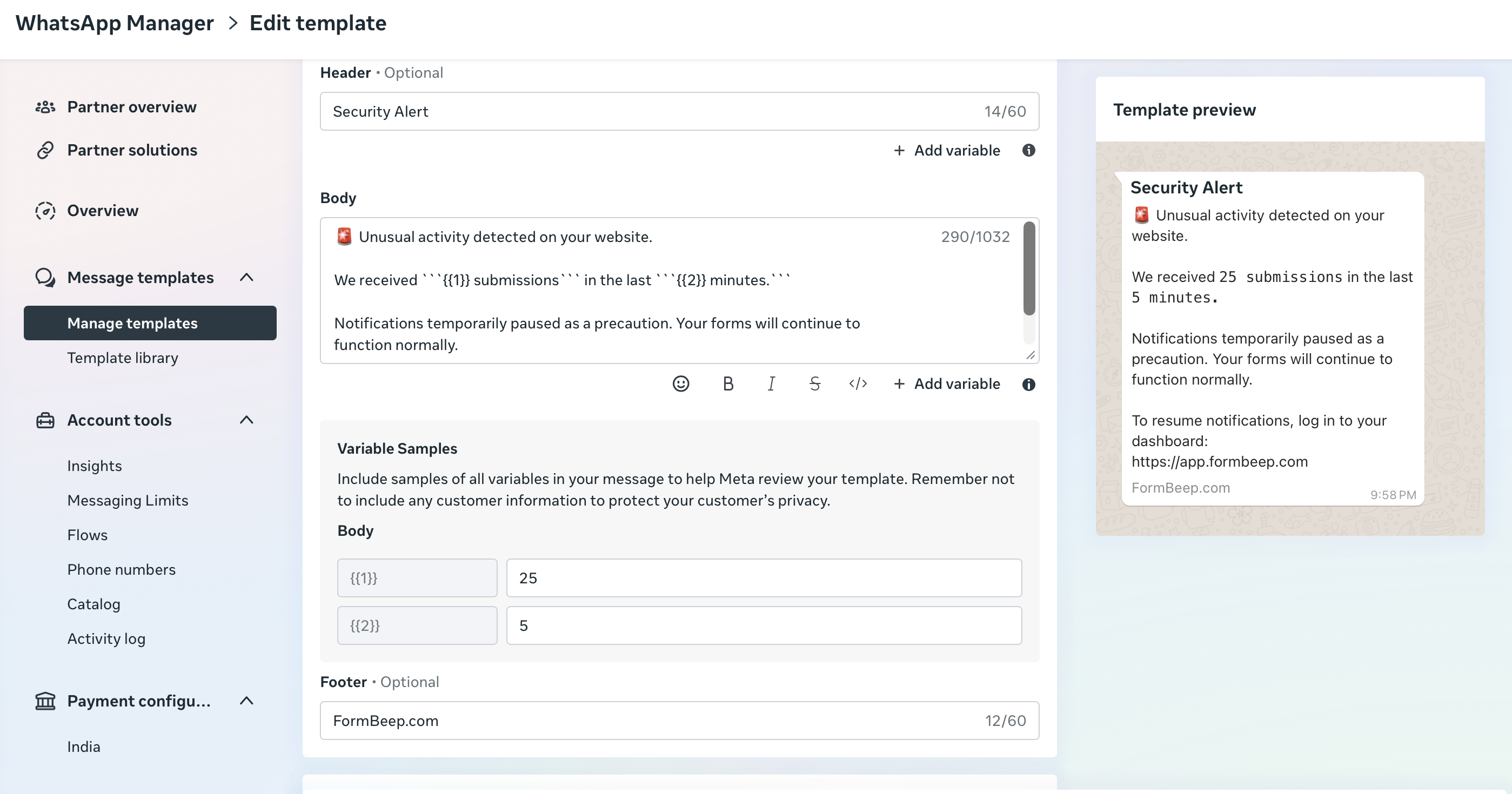
The category matters a lot because each is priced differently. More on that below.
The 24-hour customer service window
This is the thing that trips everyone up when they first start building with the API.
When a user sends your business a message, a 24-hour customer service window (CSW) opens. Inside that window, you can send free-form replies such as text, images, and documents. You’re not limited to templates. The window controls which message types you can send; it does not guarantee that delivery is free.
Once 24 hours pass without another message from the user, the window closes. After that, you can only reach them using a pre-approved template.
A real example: a user messages you on Monday at 2pm asking about a product. You can reply freely back and forth until Tuesday at 2pm. If they go quiet and you want to follow up on Wednesday, you have to use a template. Something like “Hi, we noticed you were interested in [product]. Want us to send you more details?” – which you’d have already submitted to Meta for approval.
The reason this rule exists is that Meta wants WhatsApp to stay a messaging platform, not a marketing blast channel. You can only send free-form messages when someone has recently engaged with you directly. It’s anti-spam by design.
When I first built the notification flow for FormBeep, I tested everything locally and it worked perfectly. Then I realized why: during signup, users send a verification message, which was opening the 24-hour window automatically. In production, a user who signs up but doesn’t interact again for a day or two would never receive the free-form notification. I had to redesign the entire flow.
What’s free
Some messages remain free under Meta’s rules.
Non-template service replies are free through September 30, 2026. From October 1, Meta charges for delivered service messages after the first 1,000 service messages per business phone number each month. Reactions remain free.
Utility templates sent within an open CSW are free through September 30, 2026. Meta charges for delivered utility templates in that window from October 1.
Free Entry Point window: if a user messages you through a Click to WhatsApp ad or a Facebook Page call-to-action button and you respond within 24 hours, a separate 72-hour free window opens. Eligible messages, including templates and service replies, are free in that window.
Meta’s pricing documentation and service message update give the effective dates and exceptions.
What it actually costs
Since July 1, 2025, Meta has charged per delivered template message. From October 1, 2026, eligible service replies also incur a per-message charge after the monthly free allowance.
The rate depends on two things: the template category and the recipient’s country.
A few examples to show the range:
- India, marketing: $0.0118 per message
- India, utility: $0.0014 per message
- Netherlands, marketing: $0.1597 per message
- Colombia, utility: $0.0008 per message
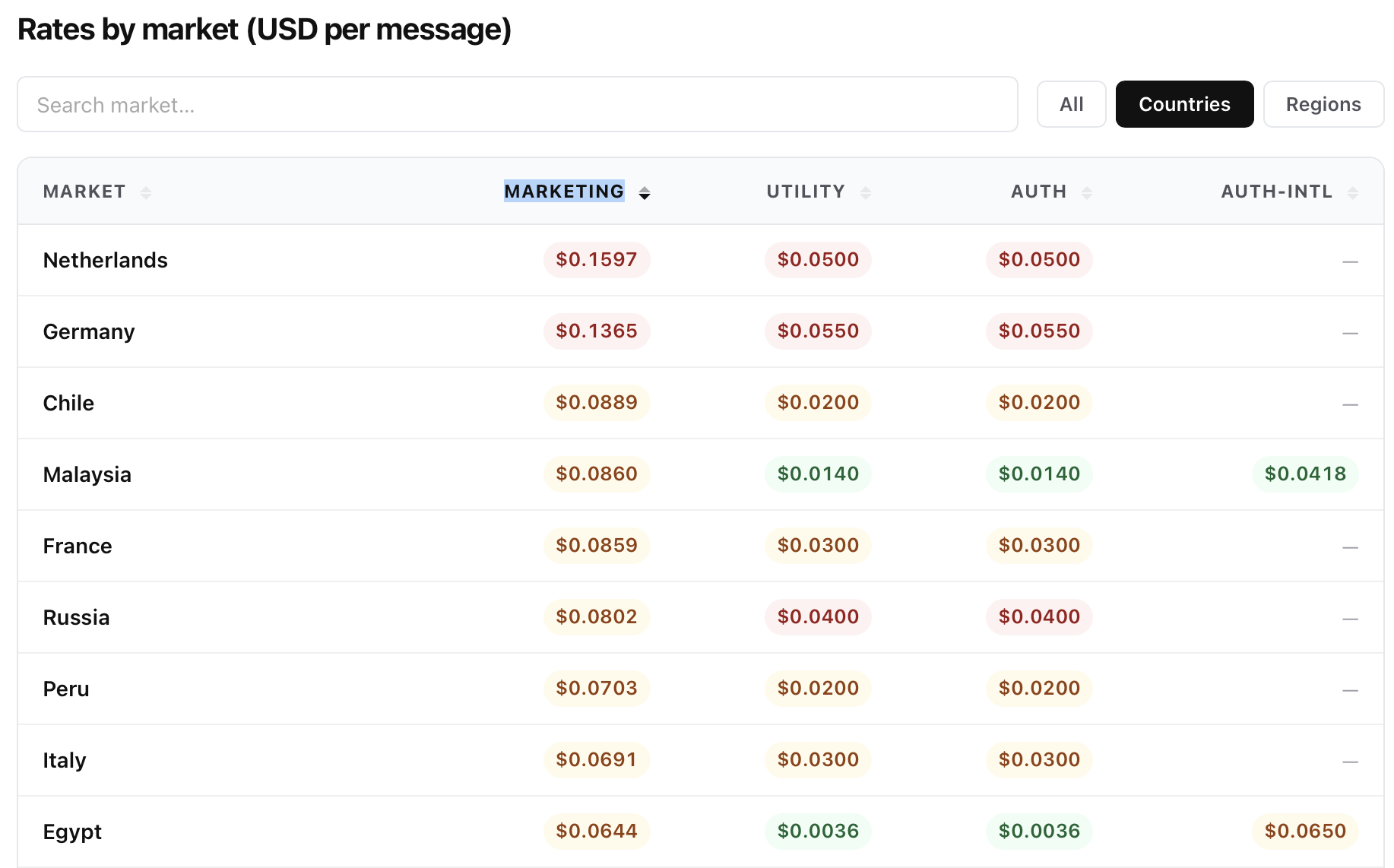
The variance is large. Sending a marketing message to someone in the Netherlands costs over 13x more than sending the same message to someone in India.
For the full rate card across countries and the October 2026 changes, see our dedicated Meta WhatsApp API pricing page.
Why it’s complicated to set up
If you’re building something custom, here’s what you’re actually signing up for.
You need a Meta Business account, a Facebook app, and a WhatsApp Business Account (WABA). Getting those set up, verified, and linked takes time and there are points in the process where you’re just waiting for Meta to review things.
Then comes template approval. You write the template, add variables in double curly braces, pick a category, and submit. Meta reviews it. Sometimes it gets rejected without much explanation and you’re left guessing what to change. You resubmit. Sometimes it takes days.
After that, you’re handling webhooks for delivery status updates, managing rate limits, setting up billing separately through Meta’s Business Suite, and keeping up with their messaging policies. Violate those policies and your WABA can get flagged or restricted.
I went through all of this building FormBeep, and it consumed far more time than I expected. The approval bottleneck alone delayed the initial launch.
You might not need any of this
If your use case is simple, like getting notified when someone fills a contact form on your website, you don’t need to deal with any of the above.
FormBeep handles the API setup, template approval, and billing so you just paste one script tag on your site and get WhatsApp notifications when someone submits your form. No Meta account setup, no webhook infrastructure, no per-country billing to track.
But if you’re building something custom at scale, like order notifications, OTPs, or a CRM integration, you’ll need to go through the setup above. Understanding the 24-hour window, template categories, and per-country pricing before you start will save you from some painful surprises mid-build.
Related
- WhatsApp Business API pricing – full rate card by country
- How to get WhatsApp notifications from Webflow forms
- How to get WhatsApp notifications from Framer forms
For exact rates by country, updated every quarter: check the latest API pricing.
With love, Rishi