Why You're Missing Leads from Your Website Contact Form (And How to Fix It)

A few months ago, a client of mine called me frustrated.He runs a small plumbing business in London and gets most of his leads through his website contact form. The form was working perfectly. Submissions were going through, emails were being sent.
The problem? He wasn’t seeing all of them.
Some were landing in spam. Some were buried under newsletters and promotional emails in the Promotions tab. And a few just never arrived at all. By the time he’d find them, it was too late. The customer had already called someone else.
This wasn’t a one-off thing. I started asking around and realized this is incredibly common, especially with small businesses that don’t have someone checking email every 10 minutes.
So I started digging into why this happens.
The Email Problem is Bigger Than You Think
Here’s what I found. Form notification emails have a deliverability problem, and it’s getting worse every year.
When someone submits a form on your website, most form plugins and services send you a notification email. Sounds simple. But there are a bunch of things that can go wrong between “form submitted” and “you read the email.”
Your hosting provider’s email gets blocked. A lot of shared hosting providers use PHP’s built-in mail() function to send emails. The problem is that these shared servers also host hundreds of other websites, and if any of them send spam (which happens constantly), the entire server’s IP gets blacklisted. Your perfectly legitimate form notification gets flagged because it’s coming from a dirty IP address.
SPF, DKIM, DMARC failures. These are email authentication protocols. If your form notification email says it’s from “info@yourdomain.com” but it’s actually sent from your hosting provider’s mail server, the receiving email provider sees a mismatch. Gmail, Outlook, and Yahoo have been cracking down hard on this. If your records aren’t set up correctly, your emails get flagged or silently dropped.
Role-based email addresses. If you’re sending form notifications to addresses like admin@, info@, or support@, email providers treat these differently. They’re more likely to filter them because role-based addresses are commonly targeted by spam. I’ve seen multiple Webflow and HubSpot forum threads where people couldn’t figure out why notifications weren’t arriving, and this turned out to be the issue.
Gmail’s tab system. Even if the email makes it through all the spam filters, Gmail might put it in the Promotions or Updates tab. Most people never check those tabs. Your form submission sits there unread while the lead moves on.
Volume-based throttling. If you’re using a transactional email service with monthly limits, a spam attack on your form can eat through your quota. Once you hit the limit, legitimate notifications stop sending entirely. You don’t even know you’ve stopped receiving them until a customer complains.
Why This Matters More Than You’d Expect
There’s a stat that gets thrown around a lot in sales: 78% of customers buy from the business that responds first. I’ve seen different numbers from different studies, but the direction is always the same. Speed of response matters a lot.
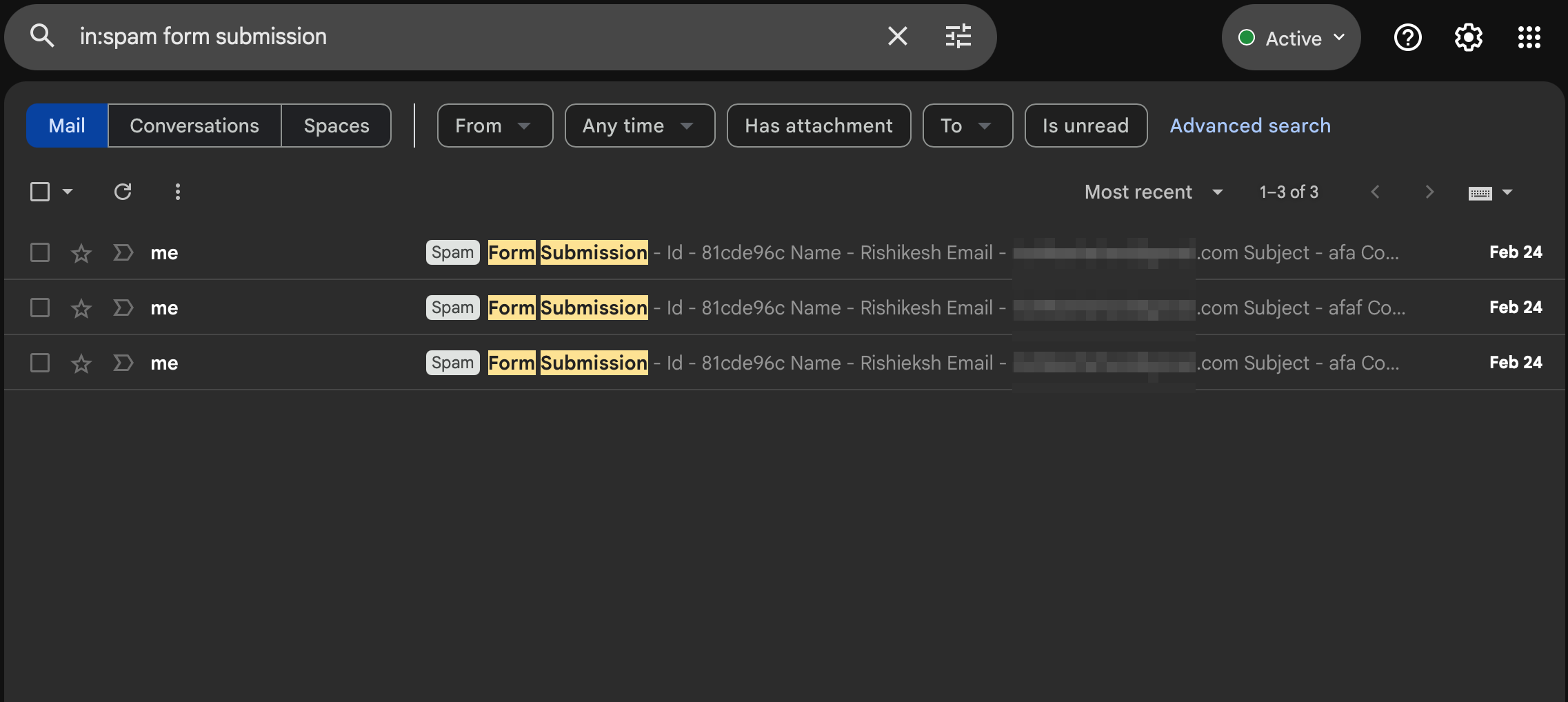
For a small business, every lead matters. If you’re a plumber, a consultant, a salon owner, or a freelancer, that form submission might be worth hundreds or thousands of dollars. Missing it because it went to spam is a terrible way to lose business.
And the worst part is you don’t know you’re missing them. It’s not like you get an error message saying “Hey, you missed 3 leads this week.” They just silently disappear.
In fact, just before writing this post, I was doing my daily cold outreach. I have this habit of emailing 10 business owners every day through their website contact forms to pitch FormBeep. Out of today’s 10, 3 forms were completely broken. They didn’t submit, threw errors, or just redirected to a blank page. These businesses have no idea they’re losing leads right now. Nobody is telling them. The leads just don’t arrive.
The Usual Fixes (And Why They’re Band-Aids)
If you search for solutions to this problem, you’ll find the same advice everywhere:
“Use an SMTP plugin.” This helps with deliverability by sending emails through a proper mail server instead of your hosting provider’s PHP mail function. Services like SendGrid, Mailgun, or Amazon SES are solid options. But you’re still sending email. You’re still competing with spam filters, tabs, and the general noise of someone’s inbox.
“Check your SPF and DKIM records.” Absolutely do this. But most small business owners have no idea what SPF or DKIM even means, let alone how to configure them. And even with perfect authentication, emails can still end up in spam.
“Add the notification address to your contacts.” This helps with Gmail’s filtering, but it’s a workaround, not a solution. You’re asking every client to manually configure their email to receive messages they should be getting automatically.
“Set up a Zapier flow to Slack/SMS.” This works, but now you’re paying for Zapier ($20+/month), managing a third-party automation, and adding complexity. For a small business with one contact form, that’s overkill.
All of these fixes try to make email work better. But what if email isn’t the right channel in the first place?
A Different Approach: What if Notifications Went to WhatsApp?
This is exactly the question my client asked me. And honestly, it made a lot of sense.
Think about how you use email versus how you use WhatsApp. Email is something you check a few times a day, maybe. WhatsApp is something you check within minutes of getting a notification. The open rates tell the story: email hovers around 20%, WhatsApp is closer to 98%.
For a form notification (which is inherently time-sensitive because someone is actively looking for your service), WhatsApp is a much better channel. You see it immediately, you can respond immediately, and you don’t lose the lead to a competitor who was faster.
That’s why I built FormBeep.
The idea is simple. You add one line of code to your website:
<script src="https://api.formbeep.com/v1/embed/formbeep.js" data-api-key="YOUR_API_KEY"></script>
When someone submits any form on your site, you get a WhatsApp notification with all the form data. No form migration, no rebuilding anything. It works with whatever form you already have, whether it’s WordPress, Webflow, Wix, or plain HTML.
How It Works
The setup takes about 5 minutes:
- Sign up and verify your WhatsApp number by scanning a QR code
- Add your website domain to the allowed list
- Paste the script tag before your closing
</body>tag
That’s it.
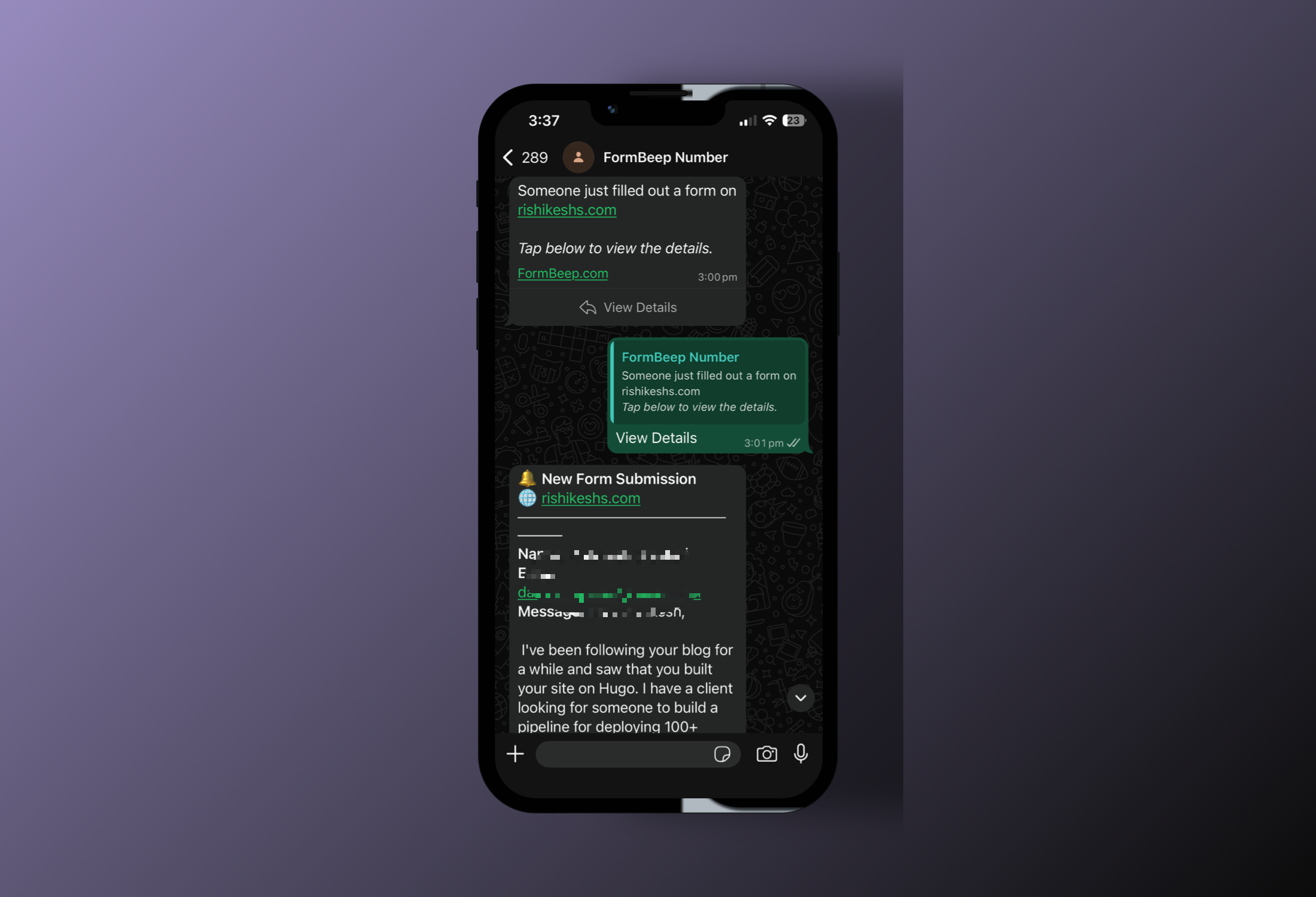
When someone submits a form, you get a WhatsApp message saying “New form submission from [your-domain.com]” with a “View Details” button. Tap it, and you see the full form data: name, email, phone, message, whatever fields were in the form.
This Doesn’t Replace Email
I want to be clear about this. FormBeep doesn’t replace your existing form setup. Your forms still work exactly the same way they always did. Emails still get sent (if that’s how your form is configured). FormBeep just adds a WhatsApp notification on top of that.
Think of it as a safety net. If the email arrives, great. If it doesn’t, you still have the WhatsApp notification. And in practice, most people end up responding from WhatsApp because it’s just faster.
Who Is This For?
If you have a form on your website, FormBeep works for you. It doesn’t matter if you’re a freelancer, a small business owner, an agency managing 10 client sites, or someone who just set up their first WordPress site last week. If your website has a form and you want to know the moment someone submits it, that’s what FormBeep does.
The Free plan includes 50 alerts total, enough to try FormBeep on a site.
Try It
If you’ve been dealing with missed form submissions or you’re just tired of the email deliverability game, give FormBeep a try. It’s free to start and takes 5 minutes to set up.
And if you run into any issues or have questions, reach out at hello@formbeep.com or find me on Discord at rishikeshs.
Happy to help you get set up.
Check out the documentation for platform-specific guides if you’re on WordPress, Webflow, or other CMS platforms.
With love,
Rishi